New Fixes: - Resolved a small UI glitch which duplicated help and support menu items under specific circumstances
- Updated preview on base pair products to displaying door hang arrow indicators
- Fixed QFP error validation messages displaying incorrect product number
New Improvements: - On automatically added 'default rooms', apply door style's specific border widths as a default instead of customer set default widths
New Fixes: - Resolved recessed handle images not being shown when adding a product.
- Resolved a bug which caused some cabinets to have the top and bottom section fields text swapped & revert naming of CSV exports to remain in line with this change.
New Improvements: - Rename fields for the Base Door & Drawer product in the product editor and PDF to give greater clarity - Change wording on production complete emails for pickup jobs to say 'Your job is now ready for pickup' - Keep manufacturers on the same page when performing job actions (e.g. if job is marked as complete from dashboard, stay on the dashboard or If a job action is performed from the jobReport page, then return to the jobReport page)
New Fixes: - Resolved UI bug which was causing cursor to jump around in notes field on the Doors & Panels / QFP screen - Resolved changes to CSV format with new item codes preventing CSV imports
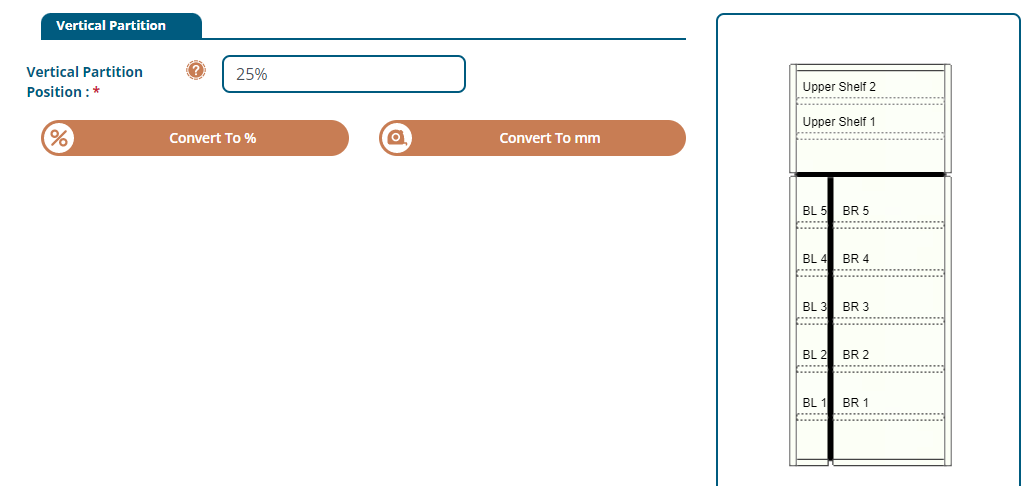
New Features: - Added a percentage feature on vertical partitions (e.g. Broom Cabinets), which change vertical partition position dynamically as a user changes cabinet width. If a 'mm position' is set, then this will be left at the specified amount and won't change as a user updates cabinet size.
New Features: - Add new functionality to enable manufacturers to specify a BCC email address, to receive copies of all customer emails being sent (Tools > Settings > Update Details - Customer Email Log)
- Add a new accounts-only email fieldfor manufacturers - so that the specified address will ONLY receive invoice and statement related emails. (Tools > Settings > Update Details - Accounts Email)
- Implemented new email templates, with improved styling, content and branding
New Improvements: - Set a character limit for appliance names
- Improved formatting of "session timed out" message
New Fixes: - Corrected the alignment of job action buttons on the dashboard, when the 'load more jobs' button is selected
- Updated the naming conventions of the sundry section banner, to adhere to the manufacturer set name for this option.
New Features: - Additional Xero integration features - invoice branding themes, individual customer payment terms, optionally disable invoice creation. - Added a keyword search to Prices > Hardware rather than a dropdown list. Simply enter a keyword such as 'Antaro' and hit enter to filter the hardware to only show results containing this keyword.
New Improvements: - Only show 'add room' popup once if a job goes through a price reset before being editable
New Fixes: - Resolved a bug which prevented mass cost edits to be applied to hidden hardware items
- Fix new hardware items having to be hidden then unhidden before they're usable
New Features: - Add ability for manufacturers to specify a default and locked edge finishes for each door styles
New Fixes:
- Resolved bug where admin-set default border widths on doors would override a customer-set value on room defaults - Added applied panels into the outsourced tab of the job report