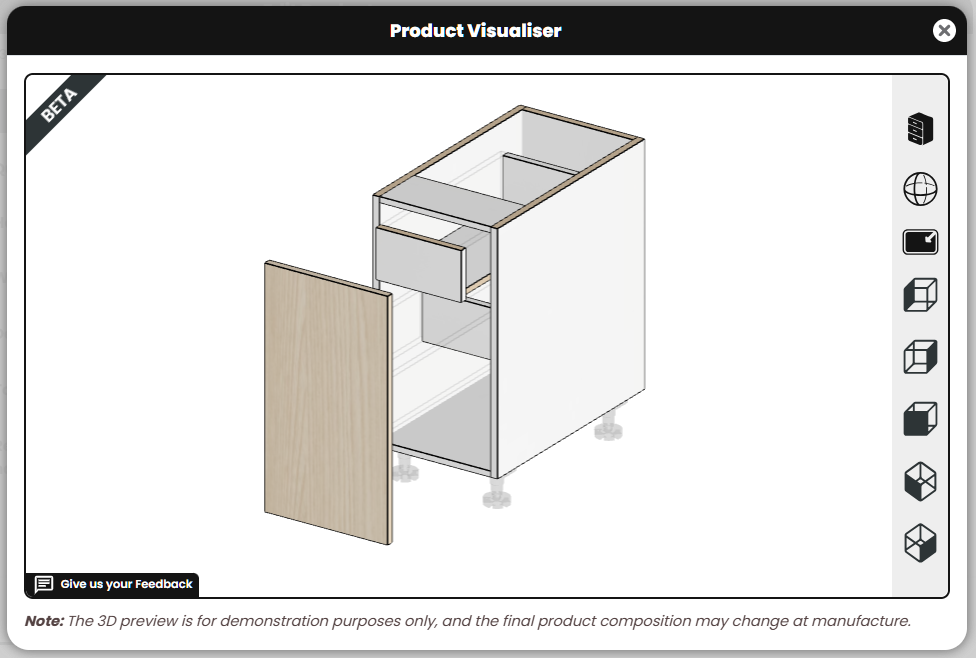
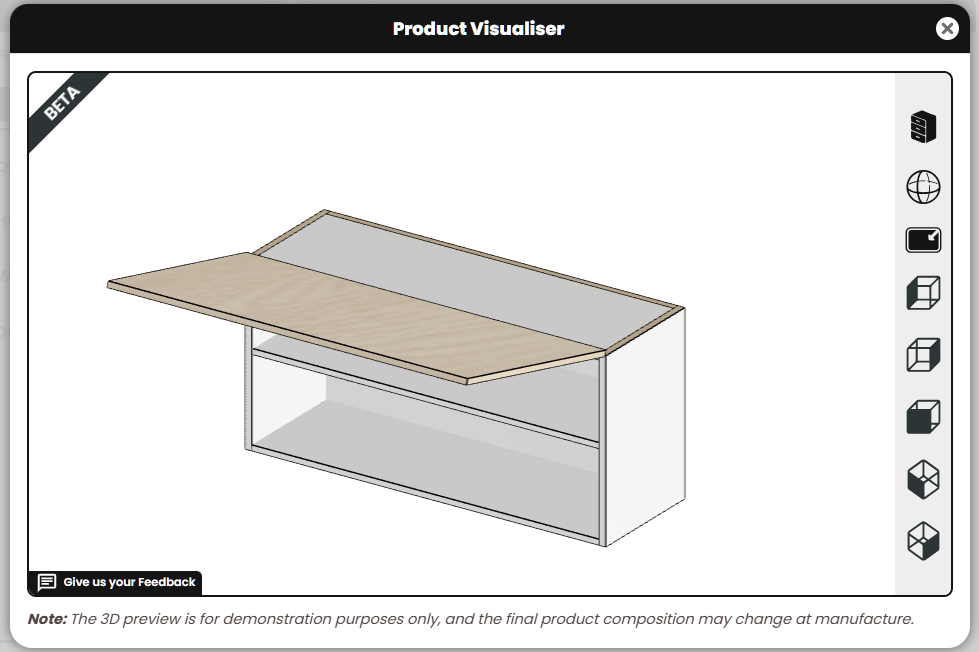
New Fixes: - We've implemented a further round of validations for material size restrictions when products are force updated via the Change Room Settings function, ensuring that appropriate validation messages are displayed where a product can't be updated if it is too big for the selected material. - Addressed a problem with the 3D preview of Pantry Executive Drawers, which now correctly displays the horizontal partition. - Applied a fix on Customer labels, so that if they are removed via the 'Edit Customer' function, the deletions are retained correctly after saving. - Fixed an issue that was popping up when trying to do a mass material update on a room that included a Wall Oven Micro cabinet. - Resolved a problem with editing Base L Shape Products where modifications to the right and left widths were resetting to default values. - We've extended browser compatibility for 3D Room Planner, ensuring that some of the visual glitches with icons in the product editing toolbar were oversized, are now resolved. - Rectified a discrepancy in the 3D Room Planner for product distances from walls, ensuring accuracy across all measurements and positioning tools. - Fixed an issue in the 3D Room Planner product editor where the material grain option wasn't properly adapting when switching grain orientations. - Resolved a depot issue, ensuring when a Customer is edited and the depot is changed, the new selection is updated and retained effectively.
New Improvements: - Big news! We've made a massive, under-the-hood upgrade to our technology to a new version of PHP. This upgrade brings significant performance improvements (that means faster loading times for you and your clients), more efficient memory usage, and enhanced security features. This upgrade reinforces our commitment to performance and continually utilising the latest and greatest technologies.
-We've enhanced the File Upload section on the new job creation page for your Customers. To reduce confusion, this section is now collapsed by default, making it clear that file uploads are optional. This change aims to reduce the number of abandoned job creations by clarifying the process.
File Upload section collapsed by default on new job creation form
New Fixes: - Resolved an issue affecting custom text fields on iOS devices, where Customers occasionally saw a "NaN" display when entering a custom colour. - Applied a fix to the customisation of products on the Favourite Products page. - Corrected the product image display in the detailed cart view now accurately reflects the product added, addressing some previous instances where incorrect images were shown.
New Features: - We've added a new function to easily refresh the pricing on a given order by adding a 'Reset Prices' button on the job dashboard. This is only applicable to jobs which are in 'Processing' status. This new feature aims to give you more tools to be able to manage the price of an order, and refresh it for whatever reason (e.g. lowering a customer's markup, and wanting that to apply to an order that they had quoted before the reduction).
New Fixes: - The "Load more jobs" button on the Manufacturer dashboard has been fixed across the different job statuses, ensuring smooth view of the next batch of jobs. - Resolved an issue where the Benchtop curved end CornerCutOut data string in CSV was not displaying the CutType as intended. It will now correctly show as FILLETCLIP, reducing any potential confusion. - We've addressed an inconsistency in the search bar on the Manufacturer dashboard where certain keywords were not returning their matching records.
New Fixes: - Resolved a visual glitch which was causing hidden hardware not to appear when the hidden filter was used to display options on the Hardware list page for manufacturers. This ensures that all hardware, whether visible or hidden, is correctly categorised and displayed. - Fixed a problem where editing a product would inadvertently increase the room product count in the side cart. Now, product edits will reflect accurately without affecting the display in the cart. - We've resolved some overlapping quirks that were happening with corner cabinets within the 3D Room Planner.
New Features: - We're thrilled to unveil the first phase of the BETA preview release of the new 3D Room Planner visualisation tool. This exciting feature is designed to significantly enhance your Customers ordering experience. They can now instantly see the impact of their customisations, providing a vivid and realistic representation of 3D models for cabinets with all customisations applied in a room.
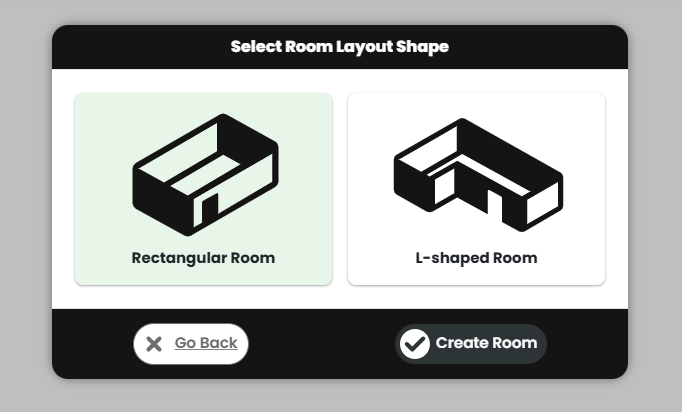
Room creation in Rectangle and L-shape formats with editable dimensions of length, width and ceiling height.
Selection of 3D Room Planner shape
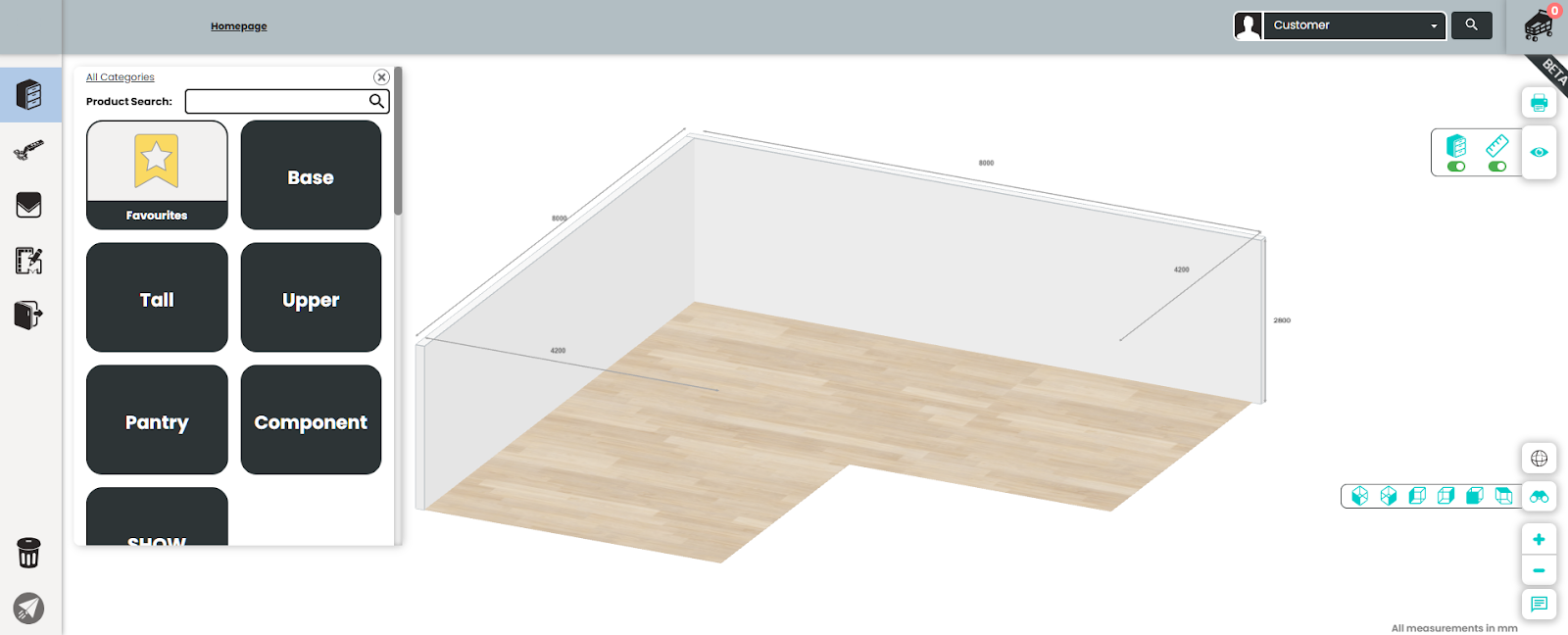
While inside the 3D Room Planner, the room and wall settings display major wall dimensions, wall thickness, and gaps between products.
The user interface features built in the 3D Room Planner:
A simplified product editor containing categories and sub categories of products which can be customised & quick add to cart.
A collapsible 3D Product Visualiser window to see the preview of the product.
Room settings can be edited without exiting the 3D Room Planner - edit default hardware, cabinet tops, material and door options which will be auto applied to the new products added to the room.
Other functional icons include visibility control, dimensions, wireframe view, preset views, zoom and submit feedback.
3D Room Planner L Shape room
A product added is dropped at the wall and has the ability to snap side by side and back to back with other products.
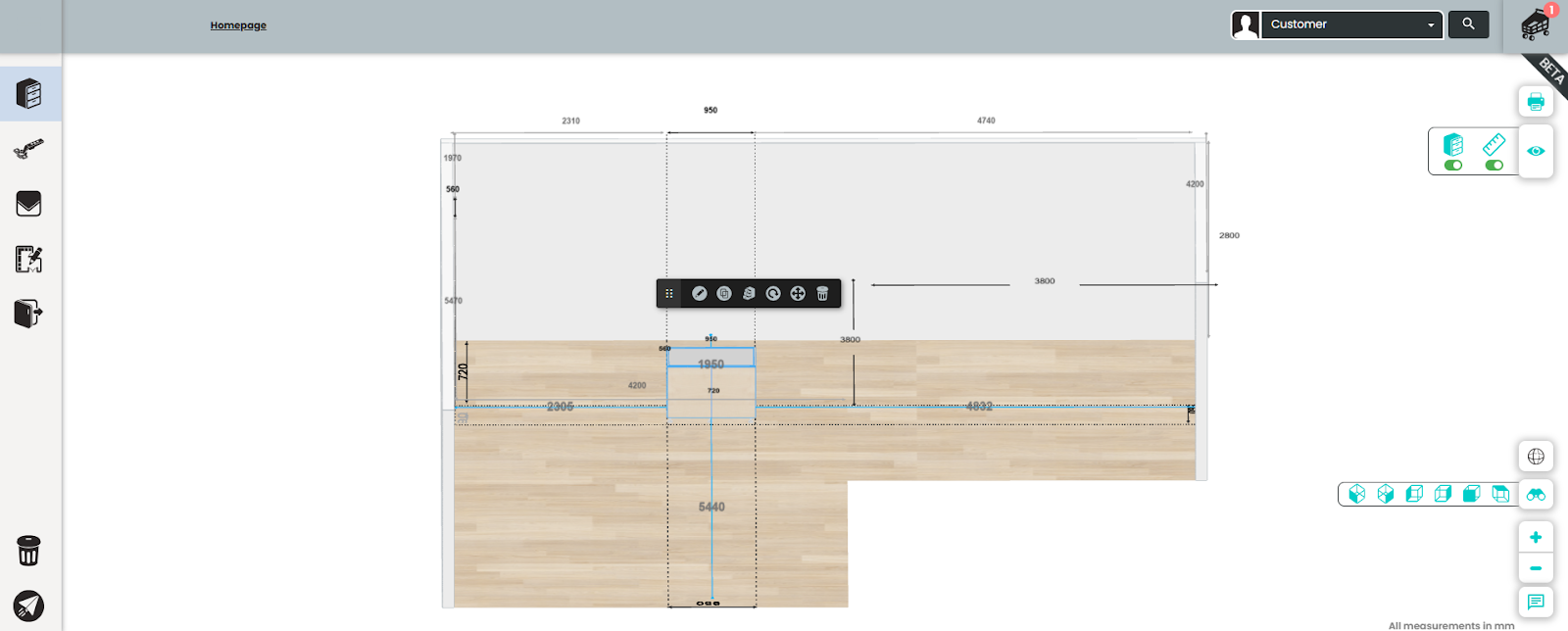
To move a product, clicking on it highlights in blue colour. It can be dragged around using the mouse or through a floating mini product editing toolbar that appears on top of the product along with further editing options including reposition.
Mini product Editing toolbar
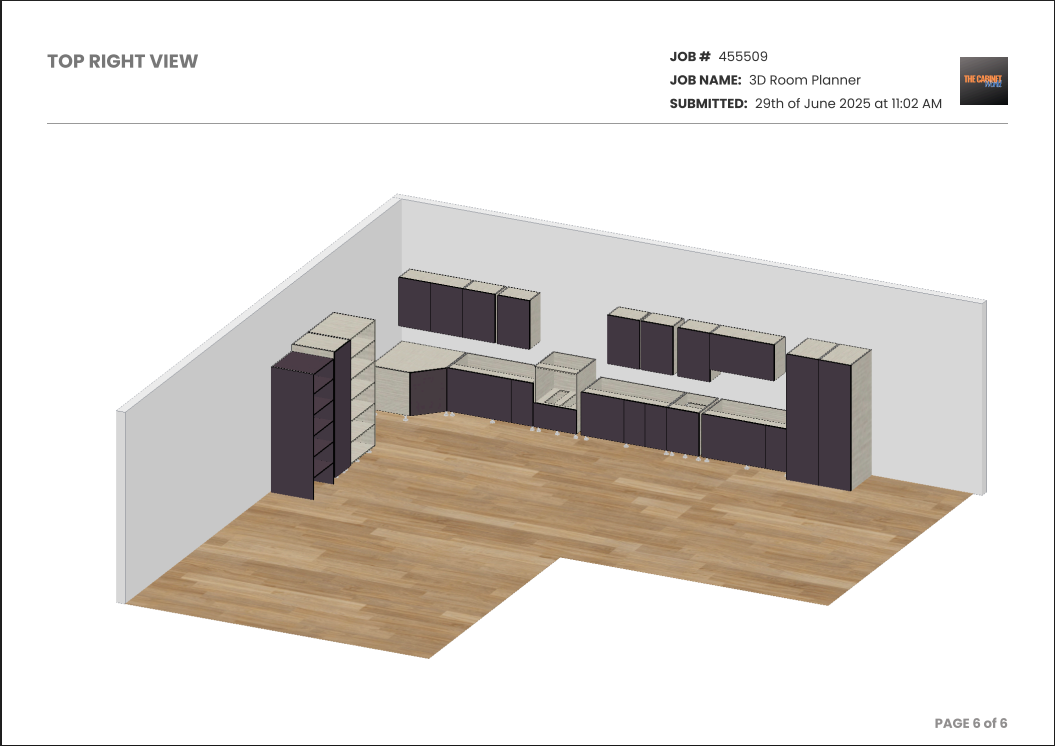
Additionally, a comprehensive 3D Room Planner PDF can be generated by Customers by using the PDF icon which includes different layouts, elevations and 3D views. Different wireframe PDF views with dimensions will assist in planning. Manufacturers can view and download the 3D Room Planner PDF for any room with the layout.
Top Right View - 3D Room Planner PDF
+ loads of other dynamic features.
New Fixes: - We have resolved an issue preventing the ability to override global settings for assembly and flatpack options on a per-customer basis. - We've addressed a display issue on drawer and bin products, ensuring when on drawers tab, switching to drawer face view displays the 2D preview. - The rendering issue with bins containing inner drawers has been fixed, ensuring they render as expected and accurately reflect on the Product Visualiser.
New Fixes: - We've resolved an issue with the material CSV download file. It now consistently retains the specified values for length and width, ensuring data accuracy. - A fix has been implemented in the image manager to address an issue where a new image with the same file name as an existing one was not being uploaded over naming conflicts. - L-shape products now respect your default width setup for both normal product editor or quick add to cart. - A validation has been added to ensure that decimal entries are not allowed in the shelf setback field by Customers. - Inner Drawer Component product will now display a validation error if a non-permitted drawer is selected as the room default.
Coming Soon: We've released some preliminary back-end changes in preparation for a limited BETA preview release of the new 3D Room Planner. More details to come shortly, keep your eyes peeled for your invite to join the BETA program!
New Fixes: - Applied a fix where Manufacturers can now successfully delete lead times, and these deletions are immediately reflected. - Streamlined some queries for the current 2D layout designer, to speed up the app & also some preparation work to ensure that previous layouts created are mostly compatible with the 3D Room Planner when released.
New Improvements: - We're excited to release the first part of a big overhaul of all the component pricing pages, starting with the Material list page, with new visual and functional improvements to make the list easier to navigate and faster to load. The Materials list now uses the sleek table design as the Customer list page. You'll find several exciting updates:
A new filter feature allows you to disable columns you don't want to see, giving you a cleaner view of the information needed.
The columns are fully customisable, allowing you to drag and reposition them in the order of your preference, helping you find the things that are important to you more easily.
We've tidied up the quantity of numbers on the table view by hiding default values. These can now be viewed, when required, by clicking the eye icon in the options column.
For more streamlined navigation, a scroll slider has been added at the bottom of the page.
Material records now also show their colour swatches, making it easier to distinguish between different options.
We've changed the Hide/Show Items button as well as the Delete Items button so that they now only appear when items have been selected with the checkboxes. Now when a material record is selected, the action buttons will popup and float over the middle/bottom of the material table for easy access.
Pricing columns now include /m² to reinforce the pricing methodology
Editing items now opens directly underneath, so you can confirm changes before applying them to the current set values.
All filters are now searchable via text
+ loads of extra quality of life improvements
- We've also listened to feedback and improved the PDF generation process. Now when viewing the Job Details PDF's, it will redirect to a preview page to speed up viewing process. This PDF-like preview page will ensure job details can be viewed sooner so customers can validate their orders in real-time while the full PDF generation is happening behind the scenes. When they are ready, they can click the download Icon New PDF Preview Screen New Fixes: - We resolved a bug in the Xero integration, where a job which was sent back with variations and the subsequently approved wasn't properly creating a replacement invoice appended with "_1" to clearly indicate revisions. - Resolved an issue where clicking the Job Details PDF link on the Customer dashboard & job list page unexpectedly triggered an unsubmit action and enabled job editing mode in specific instances. - Corrected a visual glitch on certain mobile screens which made the PDF button (in the cart menu) appear off screen and inaccessible. - We've ironed out some kinks where the labels assigned to Customers were intermittently not displaying in the pending approval and customer approved sections. - We've polished up the enforcement of product-level material restrictions in Quick Add to Cart ensuring that the appropriate error message is displayed informing users of any restriction violations.
New Improvements: - We've enhanced our CSV upload functionality to include visibility of items as a configurable option by adding a new Visibility Status column. This allows you to both export your list of components (Materials, Edges, Hardware and Door/Drawer Faces) and display the current status of the options (are they hidden or available to your customers?), but also import this back in and update the options accordingly. This new improvement will give you greater control when updating pricing and managing the visibility of items, allowing you to change prices as well as set the availability of options in one upload - drastically reducing admin time.
Visibility Status column in CSV
- We've added another round of 3D Product Visualiser templates for below products, compatible with generating previews on products, PDFs and accessible via QR code once generated.
Base Bins and Base Bins with Inner Drawers
Upper Lift Up Systems - FreeFlap
Flat Fingerpull Rail
Base Bin with Inner Drawer(no hardware supplied) model
Upper Lift Up Systems FreeFlap model
New Fixes: - We've resolved an issue where force updating the room defaults was causing disruptions in the CSV file for certain products. This fix ensures smoother operation for products that are restricted to specific hardware.
New Improvements: - We've enhanced Benchtop Materials page with import functionality. Now, you can download a CSV file of your data, make changes externally using tools like Excel, and upload the file to update all pricing in one go. Using the added prompts the backup data can be downloaded before uploading prices, which you can easily revert if needed. Additionally the CSV file now includes ID, Allow Butt Join and Max Butt Join fields.
New Fixes: - An issue has been resolved where an unexpected error occurred when a drawer was added from Door & Panels and room material was updated. - The setback option for Shape shelves on Tall Return cabinets is now automatically set to 0 ensuring that all settings related to shelf types align consistently with the product specifications. - We've improved the clarity of validation error messages for invalid products, making it easier for the Customer to identify any issues.
New Improvements: - We’ve enhanced the display of horizontal mid rails indicator on advanced doors. Now, not only are they constantly visible for Doors & Panels, but they also appear in regular Product previews under Doors tab by switching to margins view.
Single Door in Doors & Panels showcasing mid rails indicator
Base Sink 2 Door showcasing mid rails indicator under Doors tab
- We’ve added 13 additional 3D Product Visualiser templates for Bin & Laundry hamper products, compatible with generating previews on products, PDFs and accessible via QR code once generated
Base Bin (no hardware supplied) model
New Fixes: - Applied a fix to an edge case where Supply Hardware Methods remained visible on Doors & Panels despite being disabled in the Manufacturer defaults setting. - Resolved an unexpected error displayed in Doors & Panels when deleted individually. - Fixed issues related to the quick add to cart feature where in favourites page the width field was blank and base door drawer products width was incorrectly set instead of the configured default. All default values and Manufacturer restrictions are now respected and validated.
New Improvements: - We've improved the way 3D model images are generated and replaced on the detailed cart view. Previously, the customer would need to refresh their screen in order to see the new product images, however now the system will automatically update to the saved image once available, without requiring a page refresh. While generating, it will display a loading spinner on the product image. Product image loading spinner, with automatic image replacement when ready
New Fixes: - Fixed a display issue with the "load more jobs" button on the Manufacturer dashboard, which was randomly displaying some orders twice. - Resolved a glitch in the 3D Product Visualiser for L Shape Pantry Cabinets, where adjustable legs were not being displayed. - Addressed an issue within the detailed cart view where placeholder image text was cut off on mobile devices. The text now reads "Image is generating" (see above screenshot). - Fixed some minor issues related to PDF generation and loading. - Streamlined the generation process for cabinets, benchtops, and PDFs, consolidating and optimizing these functions for better performance and user satisfaction.
New Improvements: - We've refined the PDF pop-up alert text to provide clearer guidance when it is being generated and ready. This enhancement aims to improve your experience by keeping you better informed about the status of your PDF documents.
PDF pop up when in generation
PDF pop up once its ready
New Fixes: - Applied a fix in the colour browser where in a very edge case, specific zoomed-in screens were not displaying the 'Show All' button to view all door options. This was isolated to when there were exactly 5 door options available, and the screen size only permitted 4 to show. - CC email addresses set on customer accounts now work as expected on all email communications triggered by the platform. - Fixed an issue on the Customer dashboard where the search results was unclickable and missing a clear button in Firefox browser. - Corrected the display of the Default Drawer Face Type Name for Reduced Rails being saved as 'Individual faces'. - We've adjusted the date sorting on the Manufacturer dashboard job status tables (Pending Approval, Pending Payment, Customer Approved, In Production & Job Complete), while also adding an ascending and descending improvement to make job listings sortable by date. - We've updated an API endpoint so that the Benchtop-only PDF is now accessible via this.
New Features: - We’ve added a new Quick Add to Cart feature on the Add Product Catalogue screen. This allows Customers to super quickly add products to an order to get a rough quote, and to revisit modifying the products later to finalise details once they have received initial approval from their customer on the quote. This new feature will dramatically cut down ordering time for your customers.
The new prompt shows on hovering over the product (desktop) or after tapping the product image (mobile/tablet) and includes an input box for the quantity and width. The product will automatically adopt all other default options as set in the room defaults. Clicking the Add button will directly add the product to the cart in a matter of seconds.Product Catalogue Screen
New Improvements: - We’ve added more System32 products to our 3D Product Visualiser templates, so these products in the library are now supported with a 3D model for clients to preview as they are editing the product.
Upper Carcase cabinet with system 32 drillingCarcaseUpperSystem32 model
Tall Carcase cabinet with system 32 drillingCarcaseTallSystem32 model
New Fixes: - The Job Details PDF has been updated to display the Job Submitted Date instead of the Job Entered Date. This change reinstates this value and resolves a previously incorrect mapping. - We’ve resolved an issue where some details and specifications of products were not showing in the Job Details PDF for certain older legacy GFP Customers. - An alert is now displayed on the Xero Settings page when there is an error due to insufficient permissions or authentication issues while retrieving Xero chart of account codes. We now also allow account codes to be entered manually rather than selecting from a list also. - Resolved an error where Show PDF pop-up would incorrectly appear when on job submission no was selected and more products were added.
New Features: - We've added a new feature where you can set the ability for PDFs generated in Cabinetry.Online to automatically attach to the bills/invoices in Xero. This setting can be enabled/disabled from Tools > Settings > Xero Integration. New Xero options
Invoice PDF attached in Xero
New Improvements: - We’ve refreshed the Customer registration page with a brand new look! This update is designed to provide a smoother and more visually appealing experience for new users signing up. New Customer Registration Page
New Fixes: - The 'Continue Editing Job' button will no longer appear when there are no jobs available (e.g. if a customer creates a new account, starts a job then hits delete on the sole job in their account) - We have resolved the flickering effect that occurred when rearranging products in the detailed cart view. Products now move smoothly into their new positions. - An issue has been fixed where freight costs was removed from job orders when there were only Benchtops & Sundries in the job and room was deleted on job submission as there were no products. - We have addressed the issue of an empty error box displaying after selecting a material on System32 products.
New Improvements: - We've enhanced the job details PDF to feature a modern and visually appealing graphical design. The refreshed layout is designed to be more organised, with clear distinctions between sections. Now, there's also a summary page at the end that consolidates product information and includes hyperlinks for easy navigation, making it simpler for Customers to review their orders. The recently added QR code also features a 'View in 3D' prompt to guide users as to it's purpose, and the QR code is hyperlinked so users can click on it to view the model if they are viewing the PDF on a device.Job Details PDF new layout Job Details PDF Index summary page
- We've redesigned the collapsible sidebars on smaller screens. The left sidebar menu icons are now scaled down, and when the right sidebar is opened, it appears overlapping the detailed cart content providing more space.Smaller screen sidebars
Fixes: - We've added better error messaging when order submission fails due to a misconfigured webhook, or if the webhook URL is not responding correctly.
New Features: - In response to evolving need for more accessible and interactive experiences we are introducing a standalone version of the 3D Product Visualiser, extending the current 3D Product Visualiser which appears on the product editing screens! Now, Customers can access and interact with this standalone 3D Product Visualiser for their product configurations directly through a unique QR code for each product available on the job details PDF. Best of all, no login to an account is required to view and interact! The QR code URL link is also being passed through in the CSV file for job downloads, allowing this to be mapped through to a product's production labels, so that anyone with access to a panel for the product will be able to scan and view the model. QR code on job details PDF
Standalone 3D Product Visualiser in browser
New Improvements: - We've enhanced the Manufacturer dashboard which now loads faster, and you’ll notice separate spinning loaders for different job sections, improving data load visibility and efficiency.
New Fixes: - Fixed an issue where the server would occasionally time out during material CSV uploads, ensuring a more reliable upload process. - Resolved a minor error where Customers couldn't view all available edge colours matching the door filter on material search drop down.
New Improvements: - We've enhanced the Customer list by introducing an Upload CSV option. This new functionality allows you to bulk update customer records to specific fields of price adjustment, minimum charge, minimum freight, and customer labels which will significantly reduce the need for manual adjustments. Customer List page with new Upload CSV option
- When navigating to the CBC Support Portal through the Help & Support section, it now conveniently opens in a new tab. This allows you to keep your current page open while accessing additional support resources.
New Fixes: - Adjusted the workflow for when a customer edits a job which had been sent back by manufacturer with variation costs. Now, if the customer assigns new variations to products in the order, the job will now follow the standard job approval process and revert to Pending Approval. - The colour browser has been updated to accurately distinguish and display edge matching options for doors, accommodating two different material types. - Resolved a scenario in Doors and Panels where changing the drawer material and door using the search bar selector from a non-advanced door to an advanced door was not displaying the default Individual Faces for drawers.
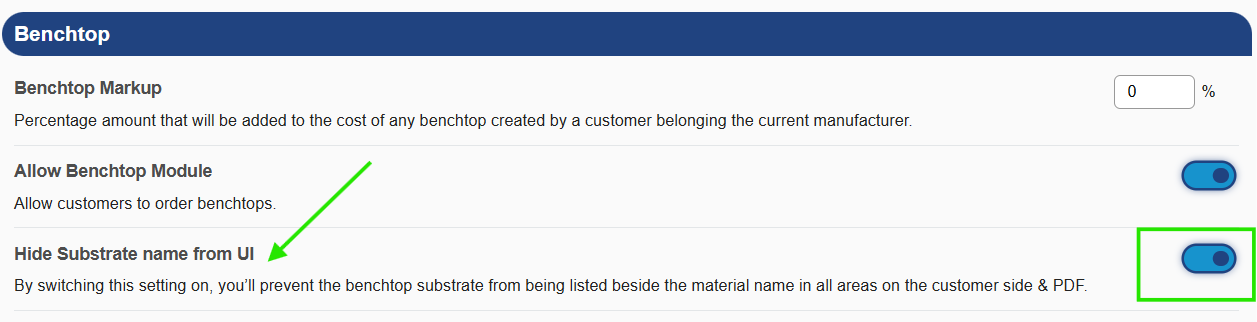
New Features: - We’ve added a new setting in Manufacturer Defaults under Benchtop, allowing you to hide substrate name from the Customer UI and PDF giving more control over customer-facing options. Benchtop settings in Manufacturer Defaults
New Improvements: - We've improved the job list page to handle large data more efficiently. If your total number of jobs exceeds 300, the CSV will be conveniently sent to your email. For 299 jobs or fewer, you can download it directly from the dashboard.
New Fixes: - We've made a quality of life fix so that customers can fully delete and re-enter values in the length field of Benchtops, rather than having to select the numbers and then overwrite. Additionally, when specific edge profiles like 'End Roll' are applied, the system now automatically handles corner clipping. - We've resolved an edge case bug where if the manufacturer default setting is to turn off assembly site-wide, but then permit a specific customer to order product assembled, it wasn't letting that customer save 'Assembled' as their default option in their settings. - The material estimates on the job report page has been updated to factor in products which have multiple quantities of parts (like framed kickers). Previously, it was only factoring in product quantities. - The estimated completion date column under production jobs section on Customer dashboard no longer includes the time - only a date. - An issue where jobs marked as "Finished Production" were transitioning to "Paid" status without manual intervention has been resolved.
New Improvements: - We’ve changed the default face type for drawer products using an advanced door style. Now, these products default to individual faces rather than collective faces. - We've completed a round of performance improvements to the loading of hardware pages.
New Fixes: - We’ve fixed the greeting message on the Customer dashboard to automatically adjust and follow the Customer’s time zone. - Adjustments have been made so that existing GFP Customer's job use the Manufacturer's default freight and dispatch options. - Resolved an error on existing goFlatpacks jobs when copied, prompts a price reset on the original job.