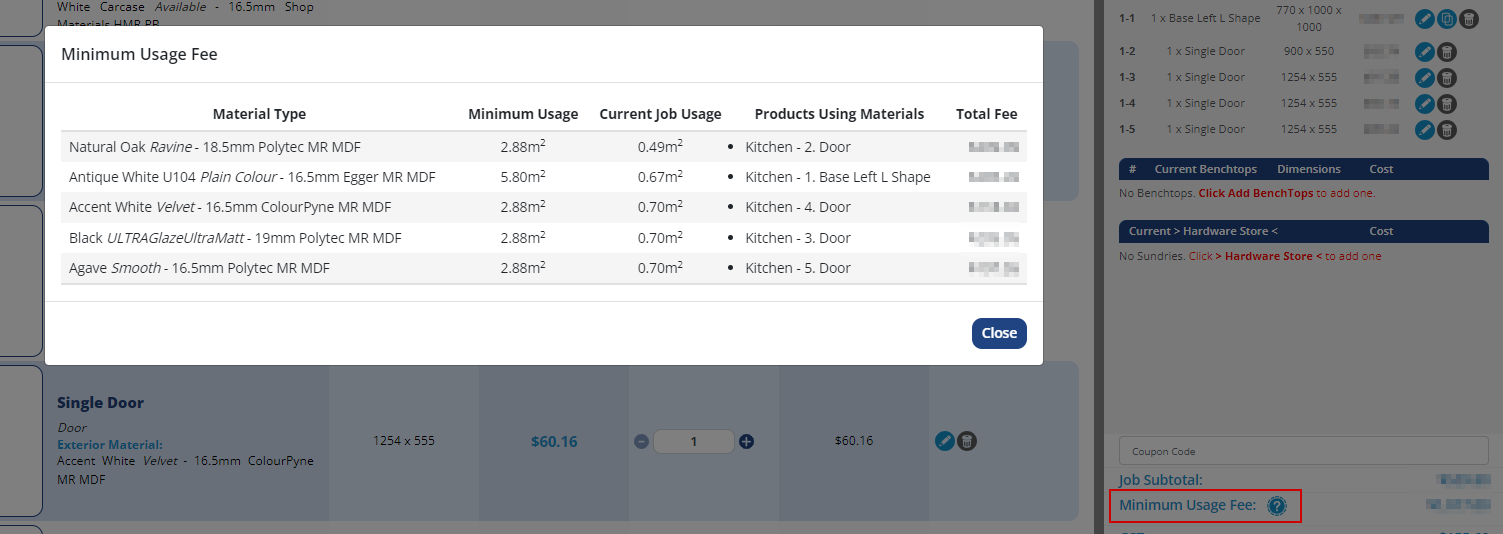
New Features! - We're excited to add two new tools as part of your on-going cost management on jobs: Minimum Usage Rollover & Yield
Minimum Usage Rollover: Enables manufacturers to charge a minimum usage fee for the initial material sheets used per job, ensuring cost recovery for materials not absorbed into job costs. This rollover with occur X times (however amount of times you want to provision in the order) before it no longer becomes relevant to the customer.
Expected Yield Factor: Allows manufacturers to set a yield percentage that adjusts material area costs to reflect the actual usable material, ensuring more accurate pricing.
New Fixes:
- Resolved a glitch where occasionally edge materials wouldn't match to material colour on room setting
- Fixed a bug where GST wouldn't show on benchtops when the 'Save and Continue Editing' option was selected (visual glitch only, GST value was added and would display on page refresh or submission)
New Improvements: - The customer dashboard UI has been improved for tablet and mobile. Includes: better utilisation of screen space, default landing on 'Quoted' jobs on mobile, vertical alignment of buttons on tablet and more. - We've hidden the "drawer face height" field on some robe products to prevent confusion
- Order Facilitation Fees are now displayed in more places: customer list, customer report, invoices, monthly statements. - The customer variations popup has been widened to allow for better display of multi-line variation requests
New Fixes: - Updated the title of the corner spec popup on Benchtop Specifier to show clip/notch based on the users selection
- Fixed an error which appeared if trying to download a blank customer list CSV (e.g. if filters had been applied and no customers met the filter criteria)
New Improvements: - Page titles (displayed on tabs) have been added to to all manufacturer login pages - making it easier to navigate when multiple tabs are open. - Optimised Improve dashboard load times for manufacturers and admins New Fixes: - Resolved an issue where estimated completion dates were being incorrectly set on jobs with variations, if they were not manually overridden - Added a tweak to refresh dashboard cart when a room is deleted so that products do not show that they are still in the job (would show correctly after a refresh).
- Corrected a glitch where if a customer set job as delivery, then changed to pickup, it would still show delivery addresses on the job confirmation email
- Resolved a bug where locked drawer products (e.g. bin units) were being changed when force-updating products through the room update feature.
Quality of Life Changes: - Removed item summary report, this will be replaced down the line with a more sturdy and functional reporting option - Clean up links to old and unused sections (e.g. old help & support links)
New Fixes: - Resolved a visual glitch where coupon details were being hidden when the 'Toggle details' was clicked on the job report - Fixed images from overlapping descriptions in the sundries section
New Feature! - We've added the ability to also export item codes (for materials / doors/ benchtops) as part of the job CSV - Added a button option for job data to be downloaded in JSON format
New Fixes:
- Resolved a bug which showed the word "undefined" appearing for some brand names in the material string
New Improvements: - We've released a stack of UI improvements: - Screen layouts dynamically change to better suit available screen space (columns change from 6 to 4 to 2 depending on screen size and device) - Supply icons (hardware/flatpack/assembled/adj legs) have been resized and formatted to use less screen space - Eliminated overlapping elements when entering notes on a product
New Fixes: - Updated Benchtop Specifier preview to resolve a bug where clipped/notched corners which had a profile applied were not shown
New Fixes - Fixed job details (job name, description etc) being missing when clicking the 'Edit Job Details' button
- Applied a patch to resolve customers being unable to save products when manufacturers hide the drawer system that the customer had selected in the room
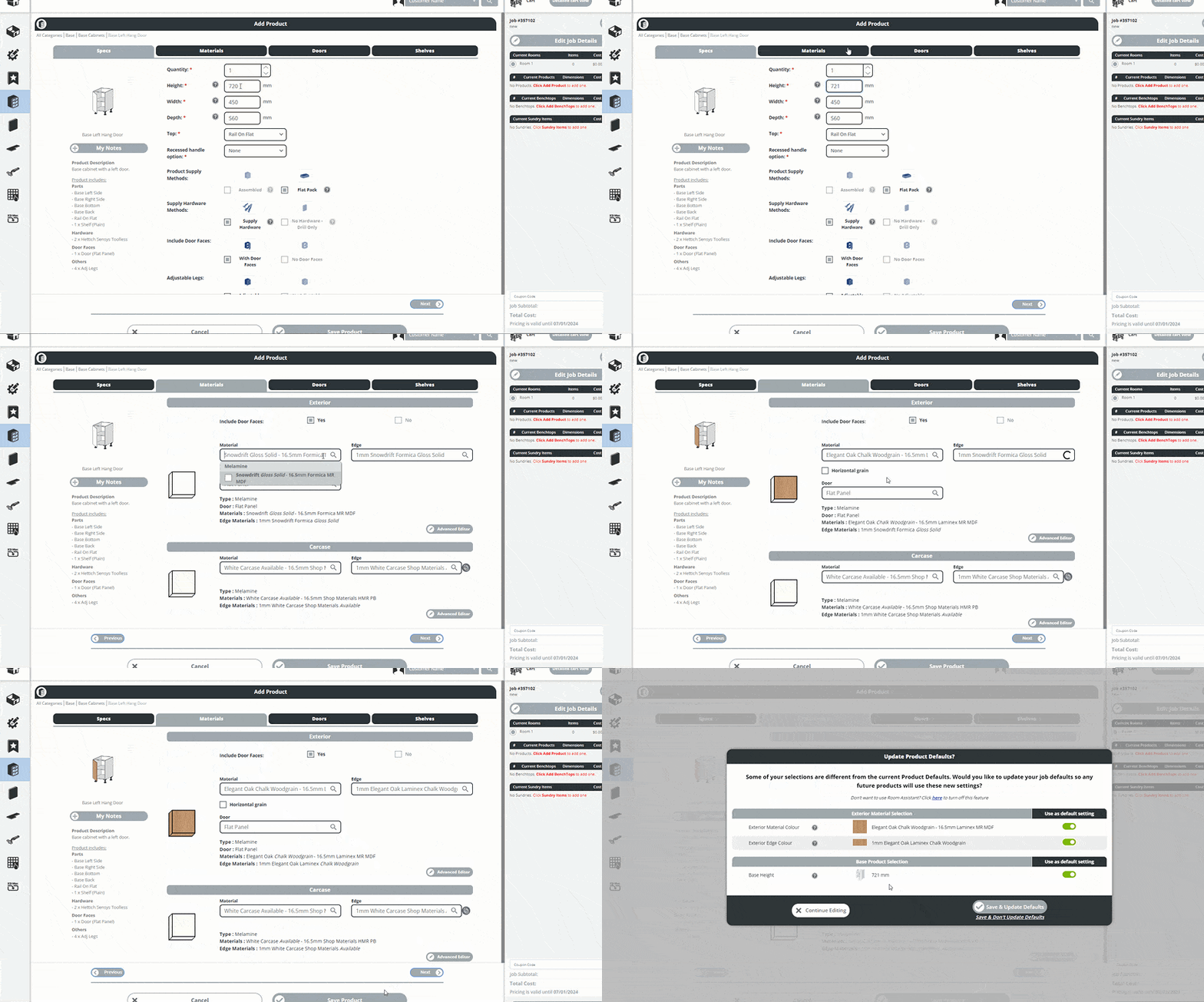
New Features! - We've implemented a new room assistant tool to help customers add products immediately, and intuitively adapt product preferences as they navigate through an order. Room Assistant
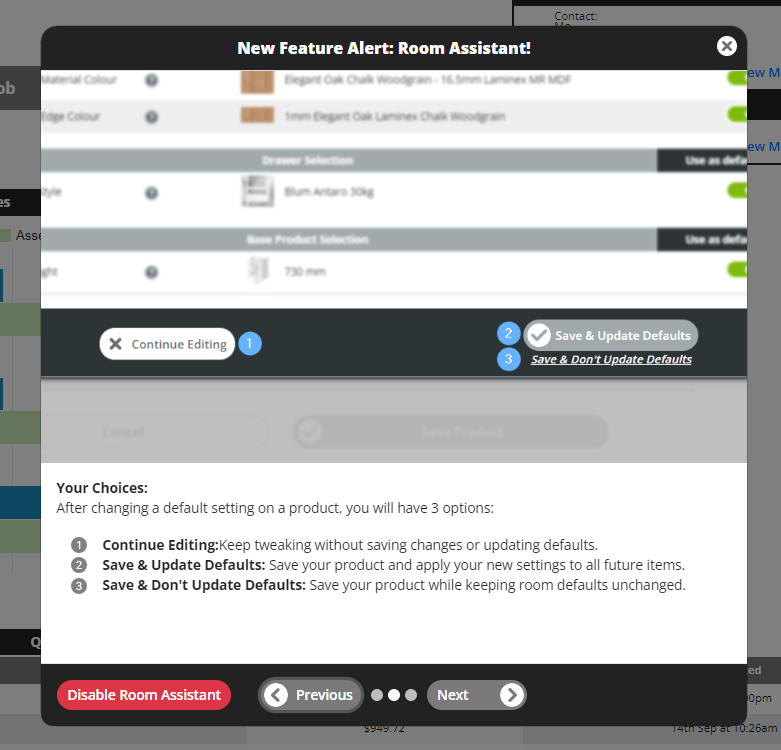
- Added a new tutorial-style popup to better explain new features and app updates Tutorial-style popup
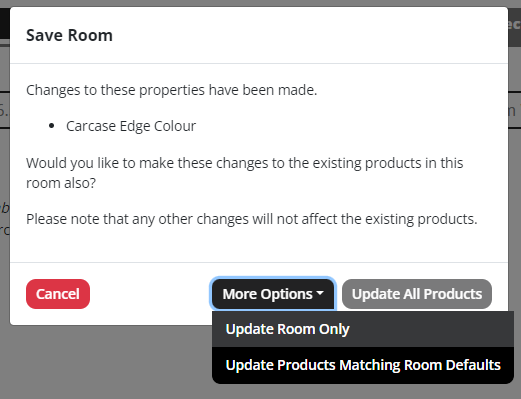
- We've also transformed the way Room Updates work, so now a user can unconditionally update products when saving rooms - this means that the products do not need to be matching room defaults in order to be eligible to be updated with room changes. Previous options (Update Room Only, or Update Products Matching Room Defaults) still remain under the 'More Options' button Room Update options
New Improvements: - Added fields to set markup and minimum freight and cost to customer registration API via wordpress Forminator plugin
New Feature! - We've implemented a new feature where the User Interface now regularly checks if there have been version changes in the back end and automatically refreshes the page if we have released a new version.
New Improvements: - Benchtop Specifier has been restricted on mobile view, while we work on improved screen layout and usability. Users will now be instructed that the module can only be accessed via desktop only.
New Fixes: - Resolved an edge case where, when a customer is selecting a pickup from a depot point, the email incorrectly listed the customer's address as the pickup point instead of the depot address. - Fixed the supply hardware checkbox being "locked" in old QFP view after changing from the default selection
New Feature! - We've added a new option in Benchtop Specifier to allow manufacturer to create new Benchtop Profiles which are selectable on benchtop ends only.
New Improvements:
- Another round of performance improvements to the room editor - users should notice rooms load up in seconds, and any further loading is contained within dropdown lists. Room is also able to be saved straight away upon clicking option, if the customer does not want to change any room default settings.
- Removed a redundant column from Benchtop Specifier matrix export to make it clearer which are the required fields
- Allow non-post formed profiles to reference SP/DP for form factor pricing
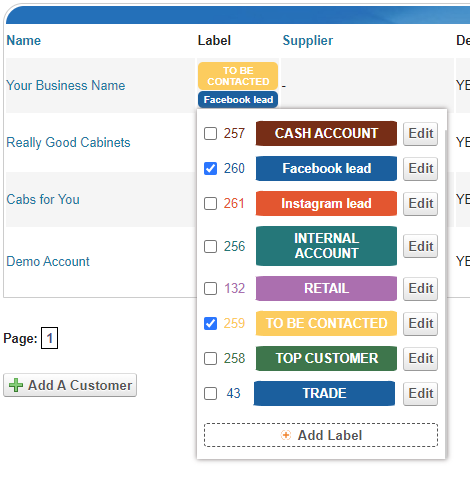
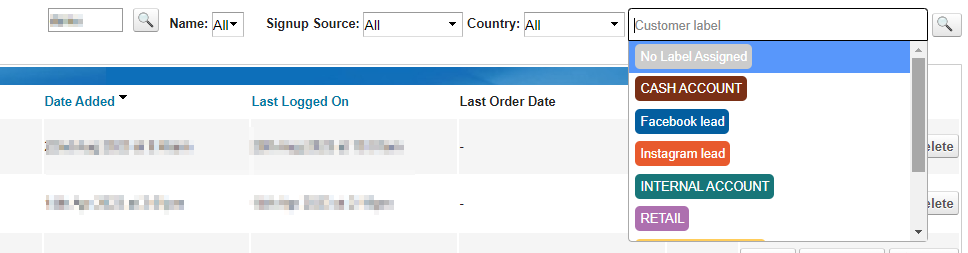
New Feature! We are excited to introduce our newest feature, fully customisable Customer Labels, designed to increase the manageability and visibility of customer accounts for better organisation and analysis. Customer Labels feature
Enhanced Visibility: Users can now apply customisable labels to customer accounts. These labels are prominently displayed above the customer’s name on all screens, ensuring easy identification at a glance. To help keep things clear, hovering over a label will show a tooltip with the full label name. Customer Labels Visibility Customer Labels - Tool tip
Advanced Filtering: Searching for customers has never been easier. With Customer Labels, users can filter their customer lists based on the labels assigned. This feature streamlines the process of grouping and finding customers according to specific criteria or attributes.
CSV Export Integration: The labels are now included in the CSV export of the customer list. This addition ensures that customer segmentation can be carried over seamlessly when importing your customer list into marketing platforms such as Mailchimp, enhancing your marketing efforts through targeted campaigns.
Reporting Tools Upgrade: Customer Labels have been integrated across various reporting screens. Users can gain deeper insights and perform granular analysis on customer quoting, job turnover, and job summaries, all with the added dimension of label-based segmentation.
Dynamic Use Cases: The new tagging system is dynamic, allowing for a variety of applications. For instance, users can tag new customers who require initial contact and remove the tag once the engagement is complete, ensuring no customer is overlooked.
Endless Possibilities: The Customer Labels feature opens the door to numerous possibilities for managing customer interactions and analysing data. We look forward to seeing how our users will leverage this new tool to optimise their customer engagement strategies.
We believe this feature will empower our users to categorise and analyse their customer base in more meaningful ways. Try out Customer Labels today and take your customer management to the next level!
New Improvements:
- Reduce icon size on hardware and assembly options to better utilise screen space
- Restore special type for the drawer faces toggle
New Improvements: - We've released a stack of speed improvements to the site, including loading Rooms (hardware items now load almost instantaneously), product load times as well as product saving. Users should notice significant improvements to the loading times throughout the app in general. - Old QFP now processes save requests for 2 products concurrently - speeding up overall save times.
New Fix: - Resolved a slightly incorrect door hang display on pantries with return panels
New Feature! - We've added a new "prefix" field to Benchtop Specifier edge profiles so that a material can have a different price matrix based on the profile that is selected.
- Resolved a glitch where the cart details were not updating automatically (unless user refreshed page) when dimensions were changed on products from the layout designer - Fixed an edge-case crash when benchtop was saved with edge profiles, then edited and all edges set to not visible.
- Prevented products being flagged as invalid when hardcoded hardware used on them (e.g. bin units) were set to using drill-only hardware by the manufacturer
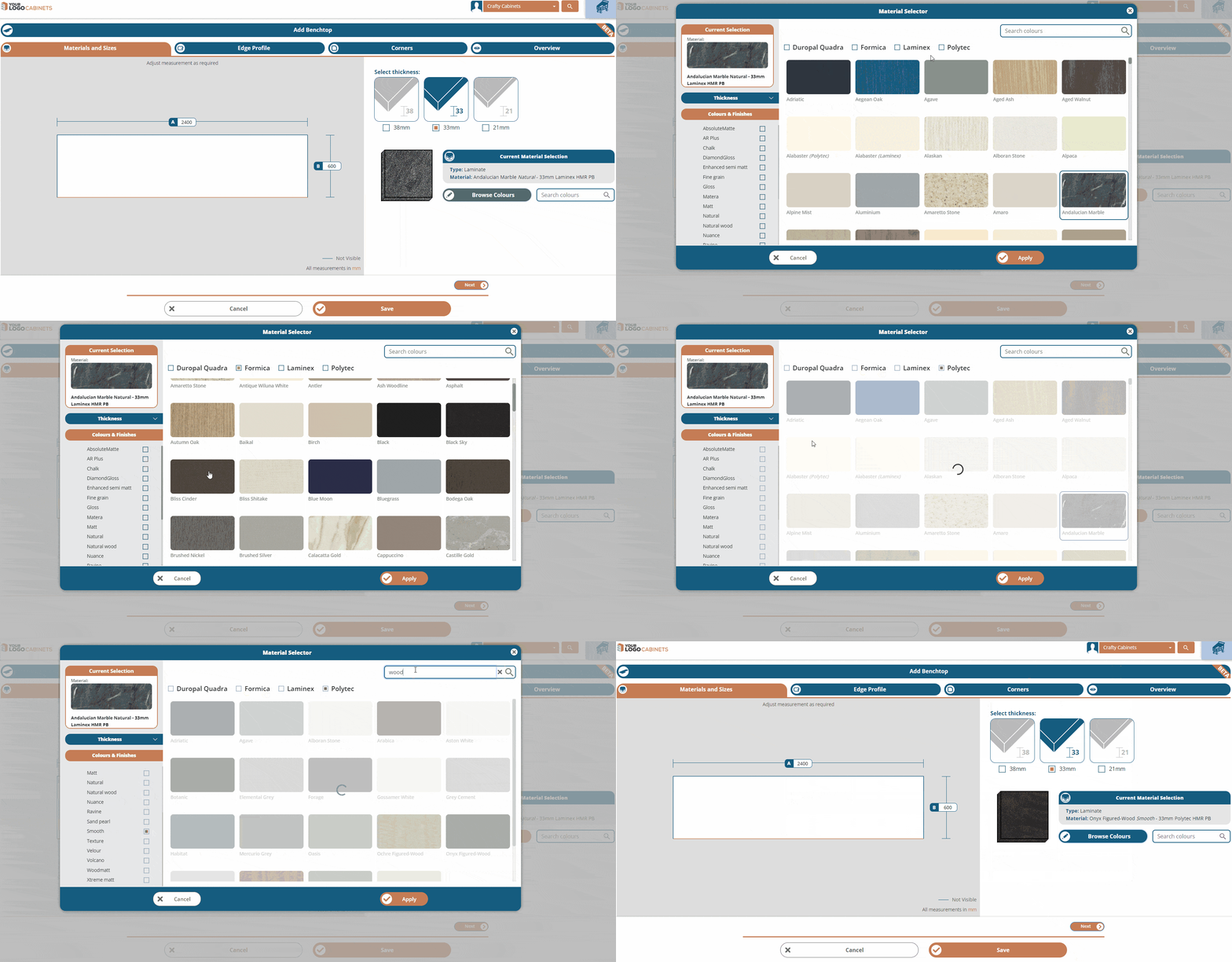
New Feature! - We've implemented a new material selector for the new Benchtop Specifier. This intuitive and visual format will be rolled out over other material selection screens in the app over the coming months
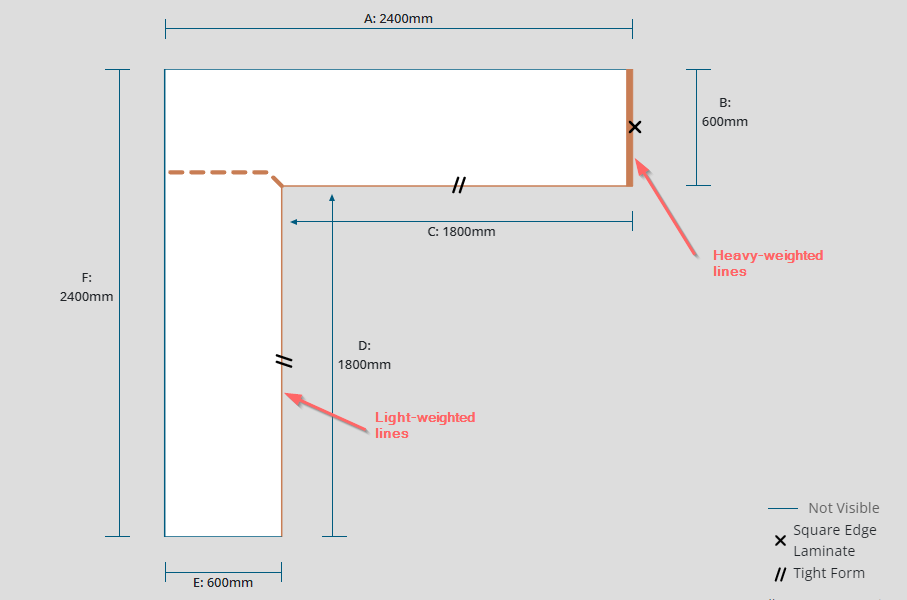
New Improvements: - Standardise how material strings are displayed throughout the app. Now it is displayed everywhere as {Colour Name} {Finish Name} - {Thickness} {Brand} {Substrate} - Add selectable line weighting for benchtop edge profiles, so manufacturers can utilise thick lines Benchtop line weighting
New Fixes:
- Resolved a glitch where hard-defaulted border widths weren't applying correctly to products in the old QFP view
BETA-only access finished - new Doors & Panels screen & Auto Save
BETA-only access has now finished for the new QFP / Doors & Panels screen. All customers will now see the search function and get access to the auto save and speed improvements by default. Here's some quick user guides, for your reference: